
Gamma-gamma Model#
In this notebook we show how to fit a Gamma-Gamma model in PyMC-Marketing. We compare the results with the lifetimes package (no longer maintained and last meaningful update was July 2020). The model is presented in the paper: Fader, P. S., & Hardie, B. G. (2013). The Gamma-Gamma model of monetary value. February, 2, 1-9.
Prepare Notebook#
import arviz as az
import matplotlib.pyplot as plt
import pandas as pd
from lifetimes import GammaGammaFitter

from pymc_marketing import clv

# Plotting configuration
az.style.use("arviz-darkgrid")
plt.rcParams["figure.figsize"] = [10, 6]
plt.rcParams["figure.dpi"] = 100
plt.rcParams["figure.facecolor"] = "white"

%load_ext autoreload
%autoreload 2
%config InlineBackend.figure_format = "retina"
The autoreload extension is already loaded. To reload it, use:
  %reload_ext autoreload
Load Data#
We start by loading the CDNOW dataset.
data_path = "https://raw.githubusercontent.com/pymc-labs/pymc-marketing/main/data/clv_quickstart.csv"

summary_with_money_value = pd.read_csv(data_path)
summary_with_money_value["customer_id"] = summary_with_money_value.index
summary_with_money_value.head()
| frequency | recency | T | monetary_value | customer_id | |
|---|---|---|---|---|---|
| 0 | 2 | 30.43 | 38.86 | 22.35 | 0 |
| 1 | 1 | 1.71 | 38.86 | 11.77 | 1 |
| 2 | 0 | 0.00 | 38.86 | 0.00 | 2 |
| 3 | 0 | 0.00 | 38.86 | 0.00 | 3 |
| 4 | 0 | 0.00 | 38.86 | 0.00 | 4 |
For the Gamma-Gamma model, we need to filter out customers who have made only one purchase.
returning_customers_summary = summary_with_money_value.query("frequency > 0")

returning_customers_summary.head()
| frequency | recency | T | monetary_value | customer_id | |
|---|---|---|---|---|---|
| 0 | 2 | 30.43 | 38.86 | 22.35 | 0 |
| 1 | 1 | 1.71 | 38.86 | 11.77 | 1 |
| 5 | 7 | 29.43 | 38.86 | 73.74 | 5 |
| 6 | 1 | 5.00 | 38.86 | 11.77 | 6 |
| 8 | 2 | 35.71 | 38.86 | 25.55 | 8 |
Model Specification#
Here we briefly describe the assumptions and the parametrization of the Gamma-Gamma model from the paper above.
The model of spend per transaction is based on the following three general assumptions:
The monetary value of a customer’s given transaction varies randomly around their average transaction value.
Average transaction values vary across customers but do not vary over time for any given individual.
The distribution of average transaction values across customers is independent of the transaction process.
For a customer with x transactions, let \(z_1, z_2, \ldots, z_x\) denote the value of each transaction. The customer’s observed average transaction value by
Now let’s describe the parametrization:
We assume that \(z_i \sim \text{Gamma}(p, ν)\), with \(E(Z_i| p, ν) = \xi = p/ν\).
– Given the convolution properties of the gamma, it follows that total spend across x transactions is distributed \(\text{Gamma}(px, ν)\).
– Given the scaling property of the gamma distribution, it follows that \(\bar{z} \sim \text{Gamma}(px, νx)\).
We assume \(ν \sim \text{Gamma}(q, \gamma)\).
We are interested in estimating the parameters \(p\), \(q\) and \(ν\).
Note
The Gamma-Gamma model assumes that there is no relationship between the monetary value and the purchase frequency. We can check this assumption by calculating the correlation between the average spend and the frequency of purchases.
returning_customers_summary[["monetary_value", "frequency"]].corr()
| monetary_value | frequency | |
|---|---|---|
| monetary_value | 1.000000 | 0.113884 |
| frequency | 0.113884 | 1.000000 |
The value of this correlation is close to \(0.11\), which in practice is considered low enough to proceed with the model.
Lifetimes Implementation#
First, we fit the model using the lifetimes package.
ggf = GammaGammaFitter()
ggf.fit(
    returning_customers_summary["frequency"],
    returning_customers_summary["monetary_value"],
)
<lifetimes.GammaGammaFitter: fitted with 946 subjects, p: 6.25, q: 3.74, v: 15.45>
ggf.summary
| coef | se(coef) | lower 95% bound | upper 95% bound | |
|---|---|---|---|---|
| p | 6.248802 | 1.189687 | 3.917016 | 8.580589 |
| q | 3.744588 | 0.290166 | 3.175864 | 4.313313 |
| v | 15.447748 | 4.159994 | 7.294160 | 23.601336 |
Once the model is fitted we can use the following method to compute the conditional expectation of the average profit per transaction for a group of one or more customers.
avg_profit = ggf.conditional_expected_average_profit(
    summary_with_money_value["frequency"], summary_with_money_value["monetary_value"]
)
avg_profit.head(10)
0    24.658616
1    18.911480
2    35.171002
3    35.171002
4    35.171002
5    71.462851
6    18.911480
7    35.171002
8    27.282408
9    35.171002
dtype: float64
avg_profit.mean()
35.25295817604995
PyMC Marketing Implementation#
We can use the pre-built PyMC Marketing implementation of the Gamma-Gamma model, which also provides nice plotting and prediction methods:
We can build the model so that we can see the model specification:
model = clv.GammaGammaModel(data=returning_customers_summary)
model.build_model()
model
Gamma-Gamma Model (Mean Transactions)
         p ~ HalfFlat()
         q ~ HalfFlat()
         v ~ HalfFlat()
likelihood ~ Potential(f(q, p, v))
Note
It is not necessary to build the model before fitting it. We can fit the model directly.
Using MAP#
To begin with, lets use a numerical optimizer (L-BFGS-B) from scipy.optimize to find the maximum a posteriori (MAP) estimate of the parameters.
idata_map = model.fit(fit_method="map").posterior.to_dataframe()
idata_map
| p | q | v | ||
|---|---|---|---|---|
| chain | draw | |||
| 0 | 0 | 6.248787 | 3.744591 | 15.447813 |
These values are very close to the ones obtained by the lifetimes package.
MCMC#
We can also use MCMC to sample from the posterior distribution of the parameters. MCMC is a more robust method than MAP and provides uncertainty estimates for the parameters.
sampler_kwargs = {
    "draws": 2_000,
    "target_accept": 0.9,
    "chains": 4,
    "random_seed": 42,
}

idata_mcmc = model.fit(**sampler_kwargs)
Auto-assigning NUTS sampler...
Initializing NUTS using jitter+adapt_diag...
Multiprocess sampling (4 chains in 4 jobs)
NUTS: [p, q, v]
Sampling 4 chains for 1_000 tune and 2_000 draw iterations (4_000 + 8_000 draws total) took 9 seconds.
idata_mcmc
-
<xarray.Dataset> Size: 208kB Dimensions: (chain: 4, draw: 2000) Coordinates: * chain (chain) int64 32B 0 1 2 3 * draw (draw) int64 16kB 0 1 2 3 4 5 6 ... 1994 1995 1996 1997 1998 1999 Data variables: p (chain, draw) float64 64kB 5.714 5.668 6.494 ... 5.196 6.557 5.684 q (chain, draw) float64 64kB 4.1 4.145 3.842 ... 4.032 3.729 3.962 v (chain, draw) float64 64kB 18.86 18.47 15.19 ... 20.83 14.82 18.38 Attributes: created_at: 2024-06-26T12:36:52.420774+00:00 arviz_version: 0.18.0 inference_library: pymc inference_library_version: 5.13.0 sampling_time: 8.762557983398438 tuning_steps: 1000 -
<xarray.Dataset> Size: 992kB Dimensions: (chain: 4, draw: 2000) Coordinates: * chain (chain) int64 32B 0 1 2 3 * draw (draw) int64 16kB 0 1 2 3 4 ... 1996 1997 1998 1999 Data variables: (12/17) acceptance_rate (chain, draw) float64 64kB 1.0 0.3785 ... 0.9421 diverging (chain, draw) bool 8kB False False ... False False energy (chain, draw) float64 64kB 4.051e+03 ... 4.052e+03 energy_error (chain, draw) float64 64kB -0.03456 ... -0.0594 index_in_trajectory (chain, draw) int64 64kB -1 -2 -16 -2 ... 27 19 19 23 largest_eigval (chain, draw) float64 64kB nan nan nan ... nan nan ... ... process_time_diff (chain, draw) float64 64kB 0.000166 ... 0.003844 reached_max_treedepth (chain, draw) bool 8kB False False ... False False smallest_eigval (chain, draw) float64 64kB nan nan nan ... nan nan step_size (chain, draw) float64 64kB 0.0635 0.0635 ... 0.06346 step_size_bar (chain, draw) float64 64kB 0.06791 ... 0.05799 tree_depth (chain, draw) int64 64kB 1 2 6 3 3 6 ... 4 5 7 5 6 6 Attributes: created_at: 2024-06-26T12:36:52.430582+00:00 arviz_version: 0.18.0 inference_library: pymc inference_library_version: 5.13.0 sampling_time: 8.762557983398438 tuning_steps: 1000 -
<xarray.Dataset> Size: 45kB
Dimensions:         (index: 946)
Coordinates:
  * index           (index) int64 8kB 0 1 5 6 8 10 ... 2347 2348 2349 2353 2355
Data variables:
    frequency       (index) int64 8kB 2 1 7 1 2 5 10 1 3 2 ... 1 2 1 2 7 1 2 5 4
    recency         (index) float64 8kB 30.43 1.71 29.43 ... 21.86 24.29 26.57
    T               (index) float64 8kB 38.86 38.86 38.86 ... 27.0 27.0 27.0
    monetary_value  (index) float64 8kB 22.35 11.77 73.74 ... 18.56 44.93 33.32
    customer_id     (index) int64 8kB 0 1 5 6 8 10 ... 2347 2348 2349 2353 2355
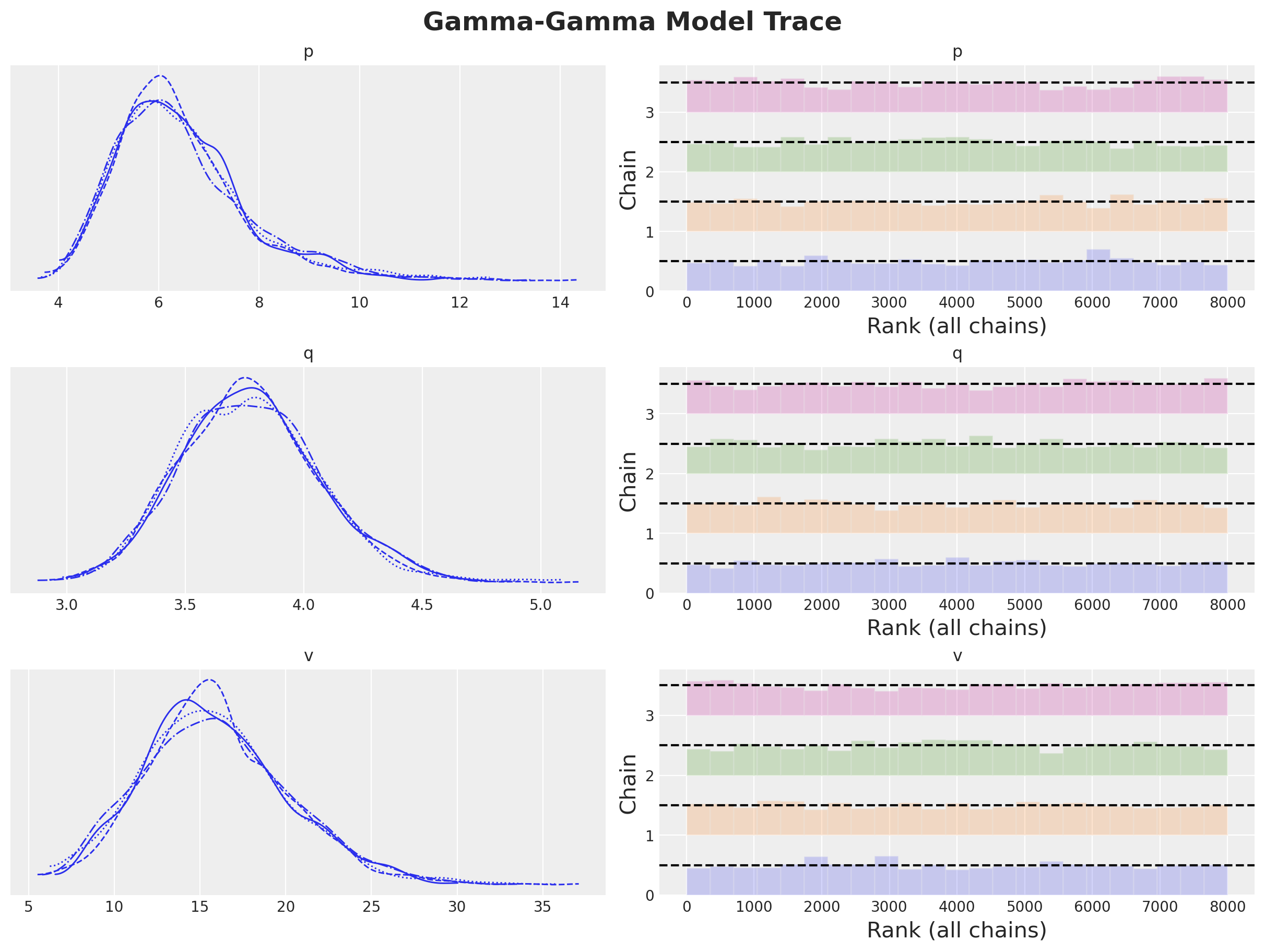
We can see some statistics of the posterior distribution of the parameters.
model.fit_summary()
| mean | sd | hdi_3% | hdi_97% | mcse_mean | mcse_sd | ess_bulk | ess_tail | r_hat | |
|---|---|---|---|---|---|---|---|---|---|
| p | 6.448 | 1.340 | 4.248 | 9.027 | 0.034 | 0.024 | 1559.0 | 1871.0 | 1.0 |
| q | 3.775 | 0.298 | 3.238 | 4.347 | 0.007 | 0.005 | 1610.0 | 2231.0 | 1.0 |
| v | 15.928 | 4.292 | 8.306 | 24.053 | 0.113 | 0.080 | 1450.0 | 1775.0 | 1.0 |
Let’s visualize the posterior distributions and the rank plot:
axes = az.plot_trace(
    data=model.idata,
    compact=True,
    kind="rank_bars",
    backend_kwargs={"figsize": (12, 9), "layout": "constrained"},
)
plt.gcf().suptitle("Gamma-Gamma Model Trace", fontsize=18, fontweight="bold");
We can compare the results with the ones obtained by the lifetimes package and the MAP estimation.
fig, axes = plt.subplots(
    nrows=3, ncols=1, figsize=(12, 10), sharex=False, sharey=False, layout="constrained"
)

for i, var_name in enumerate(["p", "q", "v"]):
    ax = axes[i]
    az.plot_posterior(
        idata_mcmc.posterior[var_name].values.flatten(),
        color="C0",
        point_estimate="mean",
        hdi_prob=0.95,
        ref_val=ggf.summary["coef"][var_name],
        ax=ax,
        label="MCMC",
    )
    ax.axvline(
        x=ggf.summary["lower 95% bound"][var_name],
        color="C1",
        linestyle="--",
        label="lifetimes 95% CI",
    )
    ax.axvline(
        x=ggf.summary["upper 95% bound"][var_name],
        color="C1",
        linestyle="--",
    )
    ax.axvline(x=idata_map[var_name].item(), color="C2", linestyle="-.", label="MAP")
    ax.legend(loc="upper right")

plt.gcf().suptitle("Gamma-Gamma Model Parameters", fontsize=18, fontweight="bold");
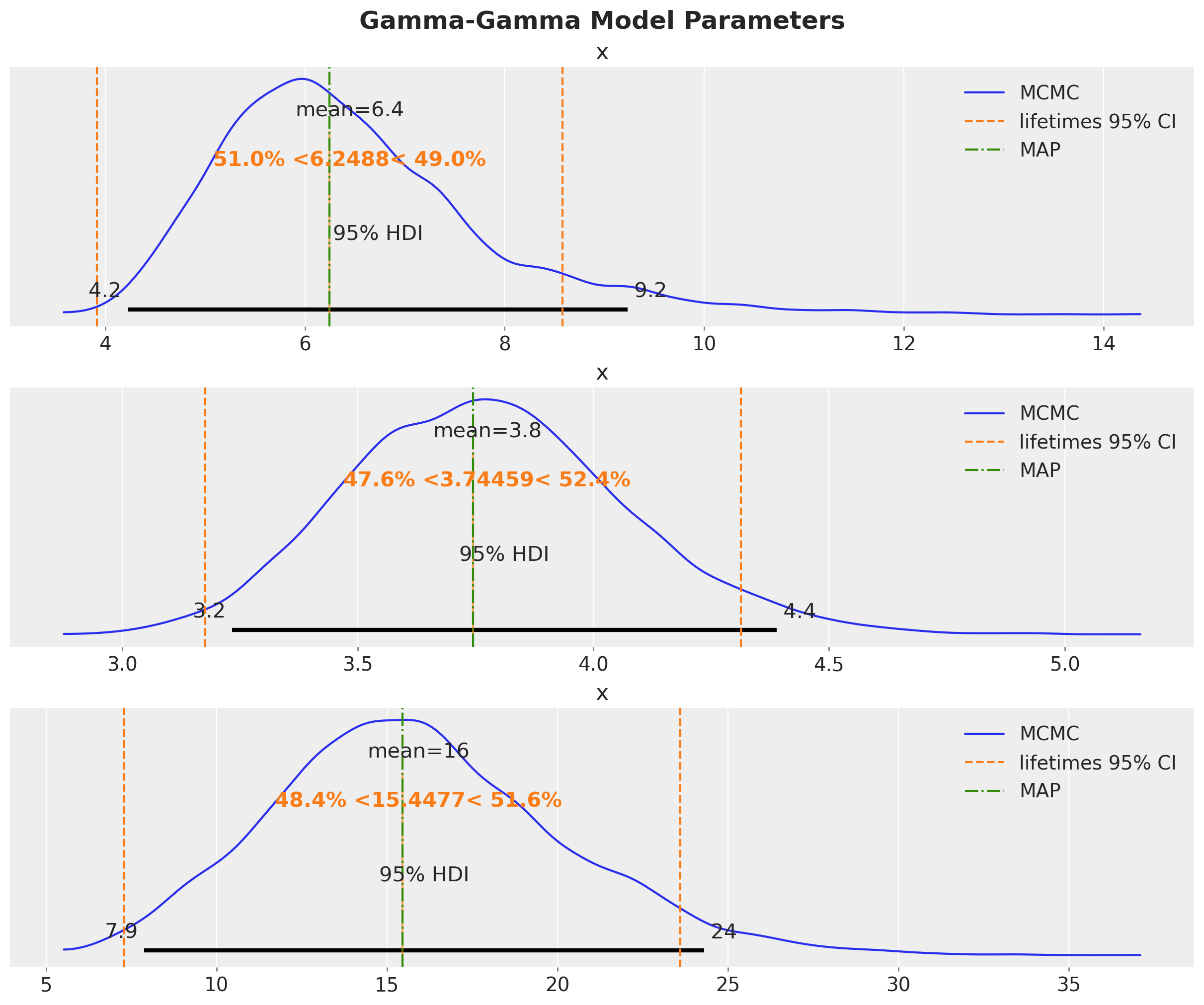
We see that the lifetimes and MAP estimates are essentially the same. Both of them are close to the mean of the posterior distribution obtained by MCMC.
Expected Customer Spend#
Once we have the posterior distribution of the parameters, we can use the expected_average_profit method to compute the conditional expectation of the average profit per transaction for a group of one or more customers.
expected_spend = model.expected_customer_spend(data=summary_with_money_value)
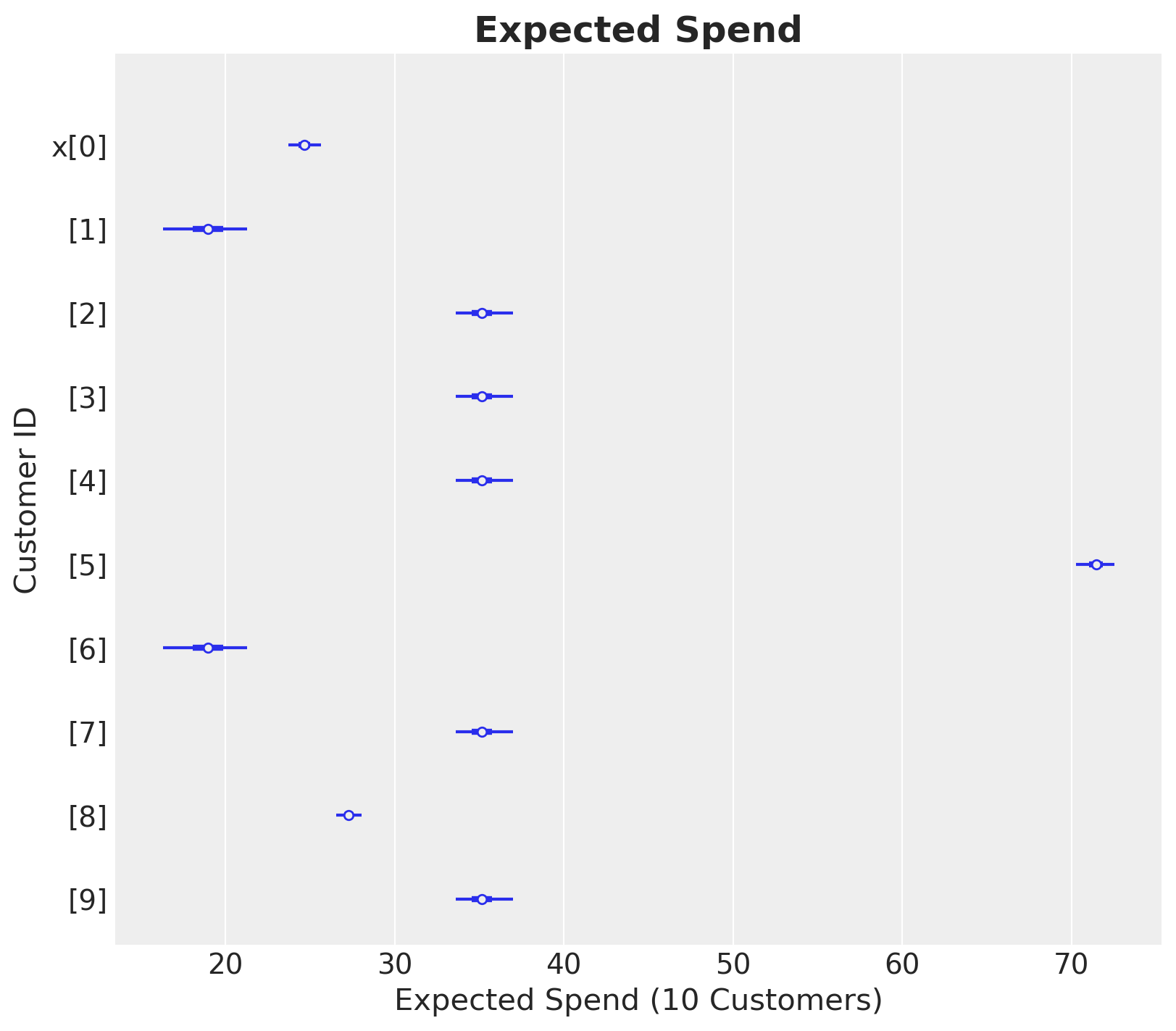
Let’s see how it looks for a subset of customers.
az.summary(expected_spend.isel(customer_id=range(10)), kind="stats")
| mean | sd | hdi_3% | hdi_97% | |
|---|---|---|---|---|
| x[0] | 24.688 | 0.516 | 23.718 | 25.651 |
| x[1] | 18.949 | 1.331 | 16.300 | 21.284 |
| x[2] | 35.183 | 0.912 | 33.600 | 37.005 |
| x[3] | 35.183 | 0.912 | 33.600 | 37.005 |
| x[4] | 35.183 | 0.912 | 33.600 | 37.005 |
| x[5] | 71.402 | 0.610 | 70.245 | 72.517 |
| x[6] | 18.949 | 1.331 | 16.300 | 21.284 |
| x[7] | 35.183 | 0.912 | 33.600 | 37.005 |
| x[8] | 27.304 | 0.395 | 26.545 | 28.035 |
| x[9] | 35.183 | 0.912 | 33.600 | 37.005 |
ax, *_ = az.plot_forest(
    data=expected_spend.isel(customer_id=(range(10))), combined=True, figsize=(8, 7)
)
ax.set(xlabel="Expected Spend (10 Customers)", ylabel="Customer ID")
ax.set_title("Expected Spend", fontsize=18, fontweight="bold");
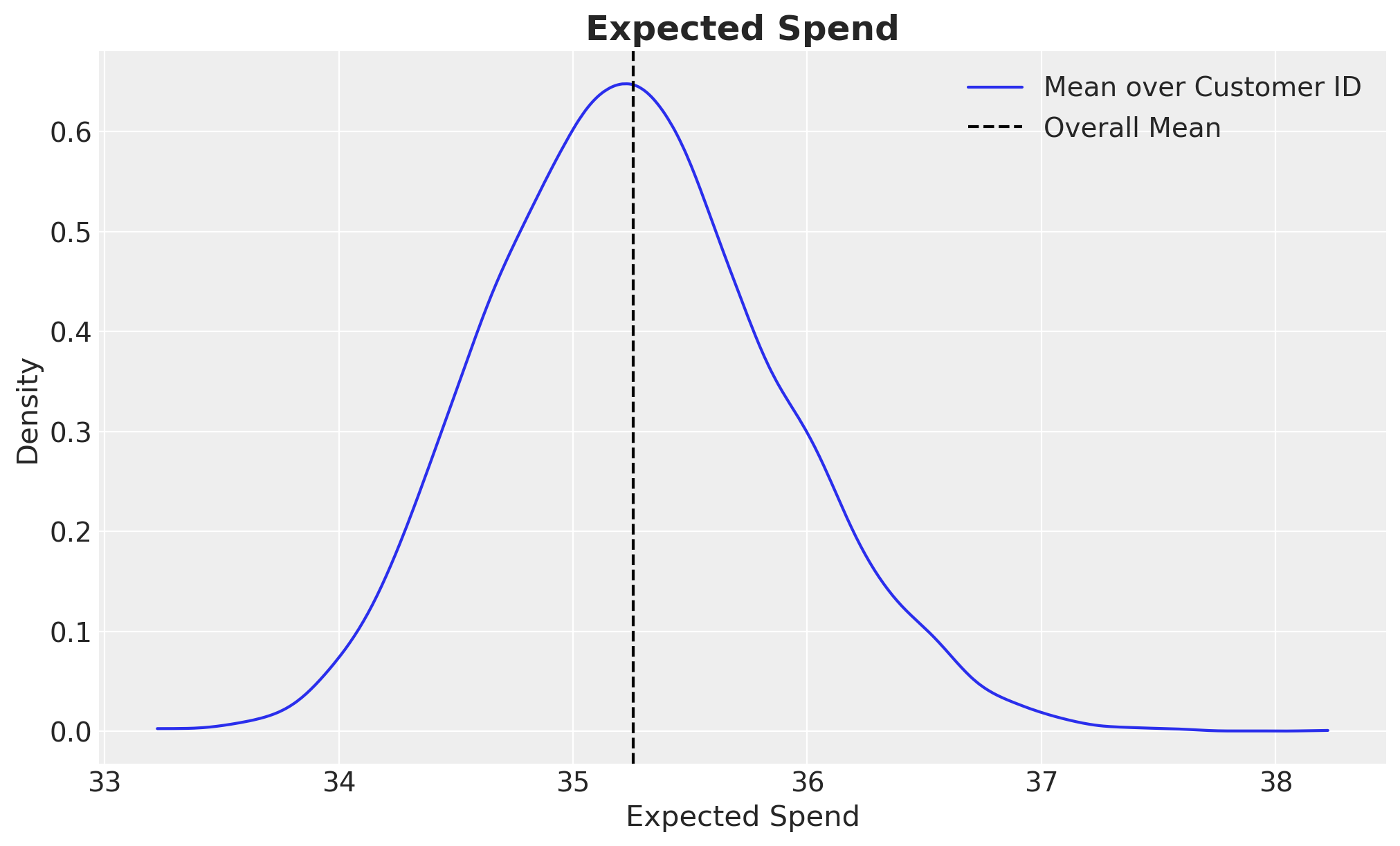
Finally, lets look at some statistics and the distribution for the whole dataset.
az.summary(expected_spend.mean("customer_id"), kind="stats")
| mean | sd | hdi_3% | hdi_97% | |
|---|---|---|---|---|
| x | 35.258 | 0.619 | 34.154 | 36.469 |
fig, ax = plt.subplots()
az.plot_dist(expected_spend.mean("customer_id"), label="Mean over Customer ID", ax=ax)
ax.axvline(x=expected_spend.mean(), color="black", ls="--", label="Overall Mean")
ax.legend(loc="upper right")
ax.set(xlabel="Expected Spend", ylabel="Density")
ax.set_title("Expected Spend", fontsize=18, fontweight="bold");
%load_ext watermark
%watermark -n -u -v -iv -w -p pymc,pytensor
Last updated: Wed Jun 26 2024

Python implementation: CPython
Python version       : 3.10.14
IPython version      : 8.22.2

pymc    : 5.13.0
pytensor: 2.20.0

arviz         : 0.18.0
pymc_marketing: 0.6.0
matplotlib    : 3.8.4
pandas        : 2.2.2

Watermark: 2.4.3