

Fivetran Data Loaders#
This notebook demonstrates how to use PyMC-Marketing’s Fivetran data loaders to quickly prepare data for MMM modeling.
If you’re using Fivetran to sync data from various sources (like Shopify, Google Ads, Facebook Ads, etc.) and have implemented the corresponding dbt packages, you can leverage our data loaders to streamline your MMM workflow.
Pre-requisites#
Fivetran dbt packages: Ensure you have the relevant schemas configured:
dbt_shopify for e-commerce data
dbt_ad_reporting for advertising data across multiple platforms
Database queries: Create queries from your database that follow the Fivetran dbt schema structure. The dbt packages standardize the output format, making it easy to work with data from multiple sources.
Workflow#
Once your data follows the Fivetran dbt schema, you can:
Use our data loaders to automatically process and format your data
Generate X (media channels) and y (target variable) datasets
Quickly train MMM models with minimal data preprocessing
Let’s see this in action:
import pandas as pd

from pymc_marketing.data.fivetran import (
    process_fivetran_ad_reporting,
    process_fivetran_shopify_unique_orders,
)
from pymc_marketing.mmm.builders.yaml import build_mmm_from_yaml
from pymc_marketing.paths import data_dir
Loading Data from Fivetran dbt Schema#
In a real-world scenario, you would typically query your database directly using the Fivetran dbt schema structure. For example:
import pandas as pd
from sqlalchemy import create_engine

# Create your database connection
engine = create_engine('your_database_connection_string')

# Query the standardized ad reporting table
query = "SELECT * FROM <schema>.ad_reporting__ad_report"
ad_data = pd.read_sql(query, engine)
As mentioned, the ad_reporting__ad_report table is created by the dbt_ad_reporting.
For this demonstration, we’re importing a CSV file that follows the exact same schema structure.
x_data = pd.read_csv(data_dir / "fivetran_examples/ad_report_schema.csv")
x_data.head()
x_data.info()
<class 'pandas.core.frame.DataFrame'>
RangeIndex: 16 entries, 0 to 15
Data columns (total 16 columns):
 #   Column             Non-Null Count  Dtype
---  ------             --------------  -----
 0   source_relation    16 non-null     object
 1   date_day           16 non-null     object
 2   platform           16 non-null     object
 3   account_id         16 non-null     object
 4   account_name       16 non-null     object
 5   campaign_id        16 non-null     object
 6   campaign_name      16 non-null     object
 7   ad_group_id        16 non-null     object
 8   ad_group_name      16 non-null     object
 9   ad_id              16 non-null     object
 10  ad_name            16 non-null     object
 11  clicks             16 non-null     int64
 12  impressions        16 non-null     int64
 13  spend              16 non-null     float64
 14  conversions        16 non-null     int64
 15  conversions_value  16 non-null     float64
dtypes: float64(2), int64(3), object(11)
memory usage: 2.1+ KB
Data Processing#
From this raw data, we don’t need all the columns and granular details. The data is currently in long format (one row per ad/campaign/day combination), but for MMM modeling we need it in wide format with aggregated metrics by platform and date.
We can quickly transform this using the process_fivetran_ad_reporting function, which will:
Aggregate the data by platform and date
Convert from long to wide format
Keep only the essential columns needed for MMM modeling
[!NOTE] Remember tables like this one usually contain information from all countries and types of media activities, by consequence the idea should be to filter by the type of media activity (e.g: awareness, retargeting, etc) and country you want to analyse before apply the data helper functions, otherwise you’ll aggregate across all type of media and markets.
x = process_fivetran_ad_reporting(
    df=x_data,
)
x.head()
| date | facebook_ads_impressions | google_ads_impressions | tiktok_ads_impressions | |
|---|---|---|---|---|
| 0 | 2025-07-10 | 30000.0 | 8800.0 | 21000.0 |
| 1 | 2025-07-11 | 31000.0 | 9200.0 | 22000.0 |
| 2 | 2025-07-12 | 32000.0 | 9500.0 | 0.0 |
by default we are using impressions, but we could decide to model with spend and it’s easy to change using a single parameter.
x_spend = process_fivetran_ad_reporting(df=x_data, value_columns="spend")
x_spend.head()
| date | facebook_ads_spend | google_ads_spend | tiktok_ads_spend | |
|---|---|---|---|---|
| 0 | 2025-07-10 | 381.5 | 185.75 | 229.5 |
| 1 | 2025-07-11 | 396.0 | 197.50 | 242.6 |
| 2 | 2025-07-12 | 410.5 | 203.80 | 0.0 |
You can modify a few things, changing the columns to pivot, the operation to run at the moment of aggregation, among others. You can take a look to the full function here:
process_fivetran_ad_reporting?
Signature:
process_fivetran_ad_reporting(
    df: pandas.core.frame.DataFrame,
    value_columns: str | collections.abc.Sequence[str] = 'impressions',
    *,
    date_col: str = 'date_day',
    platform_col: str = 'platform',
    agg: str = 'sum',
    fill_value: float | None = 0.0,
    include_missing_dates: bool = False,
    freq: str = 'D',
    rename_date_to: str | None = 'date',
) -> pandas.core.frame.DataFrame
Docstring:
Process Fivetran's Ad Reporting schema's.

Compatible with Fivetran's Ad Reporting schema:
- ad_reporting__account_report: Each record represents daily metrics by account
- ad_reporting__campaign_report: Each record represents daily metrics by campaign and account
- ad_reporting__ad_group_report: Each record represents daily metrics by ad group, campaign and account
- ad_reporting__ad_report: Each record represents daily metrics by ad, ad group, campaign and account

The input data is expected to contain at least the following columns: a date column
(default: ``date_day``), a platform column (default: ``platform``), and one or more
metric columns such as ``spend`` or ``impressions``.

Parameters
----------
df
    Input DataFrame in long format.
value_columns
    A single column name or a sequence of column names to aggregate and pivot. For
    example: "spend" or ["spend", "impressions"].
date_col
    Name of the date column. Defaults to "date_day".
platform_col
    Name of the platform column. Defaults to "platform".
agg
    Aggregation method to apply during groupby (e.g., "sum", "mean"). Defaults to "sum".
fill_value
    Value to use to fill missing values in the wide output. If None, missing values
    are left as NaN.
include_missing_dates
    If True, the output will include a continuous date index from the min to the max
    date found in the input, with missing dates filled (using ``fill_value``).
freq
    Frequency used when ``include_missing_dates`` is True. Defaults to daily ("D").
rename_date_to
    If provided, the date column in the result will be renamed to this value (e.g.,
    "date"). If None, the original ``date_col`` name is kept.

Returns
-------
pd.DataFrame
    A wide-format DataFrame with one row per date and columns for each
    ``{platform}_{metric}`` combination.
File:      ~/Documents/GitHub/pymc-marketing/pymc_marketing/data/fivetran.py
Type:      function
All ad_reporting tables can provide information about your drivers (media channels) which affect your target metric. But how can you get information from your target?
Currently, Fivetran allows you to get information from Shopify, using dbt_shopify. You can use the data loaders to access the shopify__orders schema and then transform the dataset to get the output ready for your media mix model.
y_data = pd.read_csv(data_dir / "fivetran_examples/shopify_orders_schema.csv")
y_data.head()
| order_id | user_id | total_discounts | total_discounts_set | total_line_items_price | total_line_items_price_set | total_price | total_price_set | total_tax_set | total_tax | ... | count_discount_codes_applied | order_total_shipping_tax | order_tags | order_url_tags | number_of_fulfillments | fulfillment_services | tracking_companies | tracking_numbers | customer_order_seq_number | new_vs_repeat | |
|---|---|---|---|---|---|---|---|---|---|---|---|---|---|---|---|---|---|---|---|---|---|
| 0 | 7013 | 102 | 19.6 | {"shop_money":{"amount":"19.60","currency_code... | 96.0 | {"shop_money":{"amount":"96.00","currency_code... | 97.03 | {"shop_money":{"amount":"97.03","currency_code... | {"shop_money":{"amount":"8.64","currency_code"... | 8.64 | ... | 0 | 1.0 | Welcome, Refund | utm_campaign:summer, utm_source:email | 2 | deliverr | USPS, UPS | TRK70131 | 1 | new |
| 1 | 7014 | 100 | 1.2 | {"shop_money":{"amount":"1.20","currency_code"... | 24.0 | {"shop_money":{"amount":"24.00","currency_code... | 28.13 | {"shop_money":{"amount":"28.13","currency_code... | {"shop_money":{"amount":"1.34","currency_code"... | 1.34 | ... | 2 | 0.2 | Welcome, Refund | utm_campaign:summer, utm_source:email | 2 | deliverr | USPS, UPS | TRK70141, TRK70142 | 2 | repeat |
| 2 | 7015 | 101 | 7.4 | {"shop_money":{"amount":"7.40","currency_code"... | 48.0 | {"shop_money":{"amount":"48.00","currency_code... | 42.63 | {"shop_money":{"amount":"42.63","currency_code... | {"shop_money":{"amount":"2.03","currency_code"... | 2.03 | ... | 0 | 0.0 | Promo, Welcome | utm_campaign:summer, utm_source:email | 2 | manual | UPS, USPS | TRK70151 | 3 | repeat |
| 3 | 7016 | 100 | 5.0 | {"shop_money":{"amount":"5.00","currency_code"... | 72.0 | {"shop_money":{"amount":"72.00","currency_code... | 74.50 | {"shop_money":{"amount":"74.50","currency_code... | {"shop_money":{"amount":"0.00","currency_code"... | 0.00 | ... | 0 | 0.0 | Promo, Refund | utm_campaign:summer, utm_source:email | 1 | shippo | USPS, UPS | TRK70161, TRK70162 | 4 | repeat |
| 4 | 7001 | 102 | 13.6 | {"shop_money":{"amount":"13.60","currency_code... | 72.0 | {"shop_money":{"amount":"72.00","currency_code... | 60.40 | {"shop_money":{"amount":"60.40","currency_code... | {"shop_money":{"amount":"0.00","currency_code"... | 0.00 | ... | 0 | 0.0 | VIP, Gift | utm_campaign:summer, utm_source:email | 1 | deliverr | USPS, FedEx | TRK70011, TRK70012 | 1 | new |
5 rows × 101 columns
y_data.info(verbose=True, show_counts=True)
<class 'pandas.core.frame.DataFrame'>
RangeIndex: 24 entries, 0 to 23
Data columns (total 101 columns):
 #    Column                           Non-Null Count  Dtype
---   ------                           --------------  -----
 0    order_id                         24 non-null     int64
 1    user_id                          24 non-null     int64
 2    total_discounts                  24 non-null     float64
 3    total_discounts_set              24 non-null     object
 4    total_line_items_price           24 non-null     float64
 5    total_line_items_price_set       24 non-null     object
 6    total_price                      24 non-null     float64
 7    total_price_set                  24 non-null     object
 8    total_tax_set                    24 non-null     object
 9    total_tax                        24 non-null     float64
 10   source_name                      24 non-null     object
 11   subtotal_price                   24 non-null     float64
 12   has_taxes_included               24 non-null     bool
 13   total_weight                     24 non-null     int64
 14   total_tip_received               24 non-null     float64
 15   landing_site_base_url            24 non-null     object
 16   location_id                      24 non-null     int64
 17   name                             24 non-null     object
 18   note                             11 non-null     object
 19   number                           24 non-null     int64
 20   order_number                     24 non-null     int64
 21   cancel_reason                    12 non-null     float64
 22   cart_token                       24 non-null     object
 23   checkout_token                   24 non-null     object
 24   created_timestamp                24 non-null     object
 25   cancelled_timestamp              12 non-null     object
 26   closed_timestamp                 24 non-null     object
 27   processed_timestamp              24 non-null     object
 28   updated_timestamp                24 non-null     object
 29   currency                         24 non-null     object
 30   customer_id                      24 non-null     int64
 31   email                            24 non-null     object
 32   financial_status                 24 non-null     object
 33   fulfillment_status               24 non-null     object
 34   referring_site                   24 non-null     object
 35   billing_address_address_1        24 non-null     object
 36   billing_address_address_2        24 non-null     object
 37   billing_address_city             24 non-null     object
 38   billing_address_company          0 non-null      float64
 39   billing_address_country          24 non-null     object
 40   billing_address_country_code     24 non-null     object
 41   billing_address_first_name       24 non-null     object
 42   billing_address_last_name        24 non-null     object
 43   billing_address_latitude         24 non-null     float64
 44   billing_address_longitude        24 non-null     float64
 45   billing_address_name             24 non-null     object
 46   billing_address_phone            24 non-null     object
 47   billing_address_province         24 non-null     object
 48   billing_address_province_code    24 non-null     int64
 49   billing_address_zip              24 non-null     int64
 50   browser_ip                       24 non-null     object
 51   total_shipping_price_set         24 non-null     object
 52   shipping_address_address_1       24 non-null     object
 53   shipping_address_address_2       0 non-null      float64
 54   shipping_address_city            24 non-null     object
 55   shipping_address_company         0 non-null      float64
 56   shipping_address_country         24 non-null     object
 57   shipping_address_country_code    24 non-null     object
 58   shipping_address_first_name      24 non-null     object
 59   shipping_address_last_name       24 non-null     object
 60   shipping_address_latitude        24 non-null     float64
 61   shipping_address_longitude       24 non-null     float64
 62   shipping_address_name            24 non-null     object
 63   shipping_address_phone           24 non-null     object
 64   shipping_address_province        24 non-null     object
 65   shipping_address_province_code   24 non-null     int64
 66   shipping_address_zip             24 non-null     int64
 67   token                            24 non-null     object
 68   app_id                           24 non-null     int64
 69   checkout_id                      24 non-null     int64
 70   client_details_user_agent        24 non-null     object
 71   customer_locale                  24 non-null     object
 72   order_status_url                 24 non-null     object
 73   presentment_currency             24 non-null     object
 74   is_test_order                    24 non-null     bool
 75   is_deleted                       24 non-null     bool
 76   has_buyer_accepted_marketing     24 non-null     bool
 77   is_confirmed                     24 non-null     bool
 78   _fivetran_synced                 24 non-null     object
 79   source_relation                  24 non-null     object
 80   orders_unique_key                24 non-null     object
 81   shipping_cost                    24 non-null     float64
 82   order_adjustment_amount          24 non-null     float64
 83   order_adjustment_tax_amount      24 non-null     float64
 84   refund_subtotal                  24 non-null     float64
 85   refund_total_tax                 24 non-null     float64
 86   order_adjusted_total             24 non-null     float64
 87   line_item_count                  24 non-null     int64
 88   shipping_discount_amount         24 non-null     float64
 89   percentage_calc_discount_amount  24 non-null     float64
 90   fixed_amount_discount_amount     24 non-null     float64
 91   count_discount_codes_applied     24 non-null     int64
 92   order_total_shipping_tax         24 non-null     float64
 93   order_tags                       24 non-null     object
 94   order_url_tags                   24 non-null     object
 95   number_of_fulfillments           24 non-null     int64
 96   fulfillment_services             24 non-null     object
 97   tracking_companies               24 non-null     object
 98   tracking_numbers                 24 non-null     object
 99   customer_order_seq_number        24 non-null     int64
 100  new_vs_repeat                    24 non-null     object
dtypes: bool(5), float64(24), int64(17), object(55)
memory usage: 18.2+ KB
As with the previous examples, we’re using a CSV file for demonstration purposes. However, in a real-world scenario, you would query the proper schema and data table directly from your Fivetran-connected database to get an output like this one.
# Query the standardized ad reporting table
query = "SELECT * FROM <schema>.shopify__orders"
shopify_data = pd.read_sql(query, engine)
Once you get the data from it, you can apply the data loaders in order to simplify your media mix model pipeline.
[!NOTE] Nevertheless, remember tables like this one usually contain information from all countries or type of transactions, by consequence the idea should be to filter by the type of transactions and country you want to analyse before apply the data helper functions, otherwise you’ll aggregate across all type of transactions and markets.
y = process_fivetran_shopify_unique_orders(
    df=y_data,
)
y.head()
| date | orders | |
|---|---|---|
| 0 | 2025-07-10 | 1 |
| 1 | 2025-07-11 | 2 |
| 2 | 2025-07-12 | 4 |
| 3 | 2025-07-13 | 5 |
| 4 | 2025-07-14 | 5 |
You can check the full function to validate all things which you could possibly adjust.
process_fivetran_shopify_unique_orders?
Signature:
process_fivetran_shopify_unique_orders(
    df: pandas.core.frame.DataFrame,
    *,
    date_col: str = 'processed_timestamp',
    order_key_col: str = 'orders_unique_key',
    rename_date_to: str = 'date',
) -> pandas.core.frame.DataFrame
Docstring:
Compute daily unique order counts from a (pre-filtered) Shopify orders dataset.

This function is designed for data following the Fivetran Shopify orders schema
(e.g., ``shopify__orders``). It assumes the input ``df`` is already filtered to
the desired subset (e.g., non-canceled, US-delivery, new-only orders).

Parameters
----------
df
    Input DataFrame following the Shopify orders schema.
date_col
    Column to derive the daily bucket from. Defaults to "processed_timestamp".
order_key_col
    Unique order identifier column. Defaults to "orders_unique_key".
rename_date_to
    Name of the date column in the result. Defaults to "date".

Returns
-------
pd.DataFrame
    A DataFrame with two columns: ``rename_date_to`` and ``orders``, where
    ``orders`` is the unique order count per day.
File:      ~/Documents/GitHub/pymc-marketing/pymc_marketing/data/fivetran.py
Type:      function
data = x.merge(y, on="date", how="left").fillna(0)
data.head()
| date | facebook_ads_impressions | google_ads_impressions | tiktok_ads_impressions | orders | |
|---|---|---|---|---|---|
| 0 | 2025-07-10 | 30000.0 | 8800.0 | 21000.0 | 1 |
| 1 | 2025-07-11 | 31000.0 | 9200.0 | 22000.0 | 2 |
| 2 | 2025-07-12 | 32000.0 | 9500.0 | 0.0 | 4 |
Alternative way to load data using the data pre-processing functions
# data = process_fivetran_ad_reporting(
#     df=x_data,
# ).merge(
#     process_fivetran_shopify_unique_orders(
#     df=y_data,
#     ),
#     on="date",
#     how="left",
# )

# data.head()
Once all your data it’s prepare, you can train your model 🙌🏻
mmm = build_mmm_from_yaml(
    X=data[
        [
            "date",
            "facebook_ads_impressions",
            "google_ads_impressions",
            "tiktok_ads_impressions",
        ]
    ],
    y=data["orders"],
    config_path=data_dir / "config_files" / "multi_dimensional_fivetran.yml",
)
/Users/carlostrujillo/Documents/GitHub/pymc-marketing/pymc_marketing/mmm/builders/yaml.py:104: SettingWithCopyWarning:
A value is trying to be set on a copy of a slice from a DataFrame.
Try using .loc[row_indexer,col_indexer] = value instead

See the caveats in the documentation: https://pandas.pydata.org/pandas-docs/stable/user_guide/indexing.html#returning-a-view-versus-a-copy
  X[date_column] = pd.to_datetime(X[date_column])
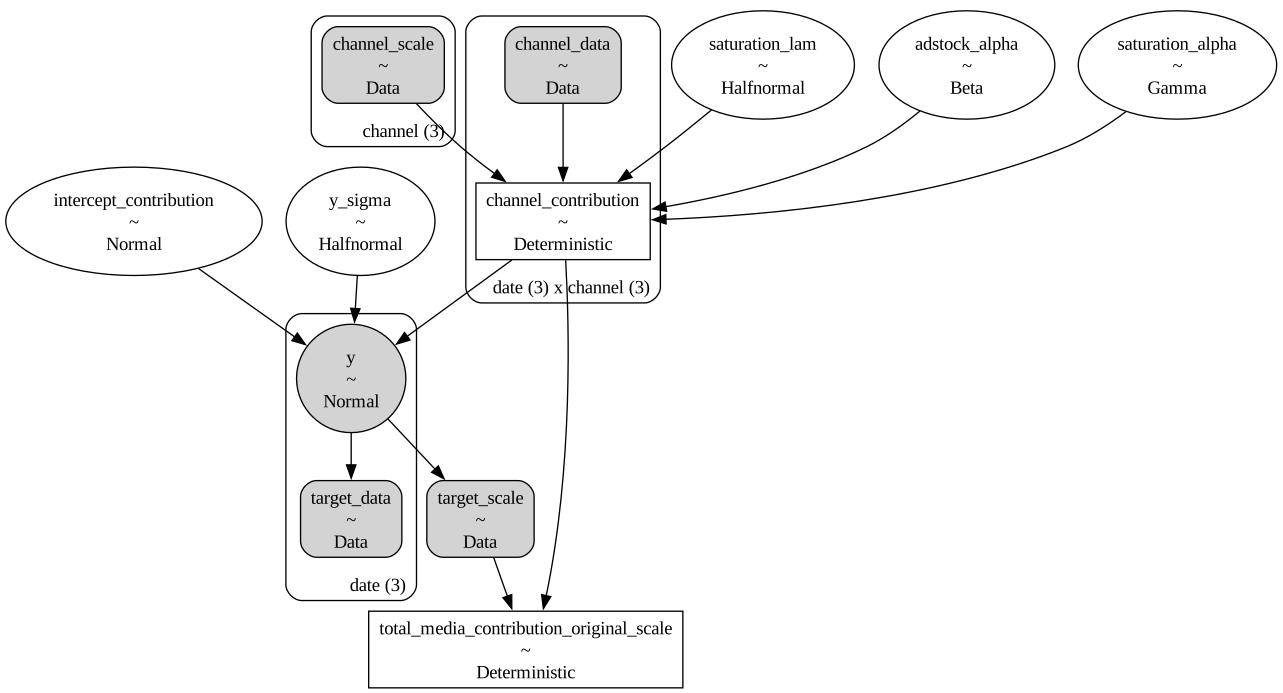
mmm.model.to_graphviz()
mmm.sample_prior_predictive(
    X=data[
        [
            "date",
            "facebook_ads_impressions",
            "google_ads_impressions",
            "tiktok_ads_impressions",
        ]
    ],
    y=data["orders"],
)
Sampling: [adstock_alpha, intercept_contribution, saturation_alpha, saturation_lam, y, y_sigma]
<xarray.Dataset> Size: 24kB
Dimensions:  (date: 3, sample: 500)
Coordinates:
  * date     (date) datetime64[ns] 24B 2025-07-10 2025-07-11 2025-07-12
  * sample   (sample) object 4kB MultiIndex
  * chain    (sample) int64 4kB 0 0 0 0 0 0 0 0 0 0 0 ... 0 0 0 0 0 0 0 0 0 0 0
  * draw     (sample) int64 4kB 0 1 2 3 4 5 6 7 ... 493 494 495 496 497 498 499
Data variables:
    y        (date, sample) float64 12kB 2.442 14.47 10.69 ... 3.808 3.132 5.092
Attributes:
    created_at:                 2025-08-14T19:24:17.732780+00:00
    arviz_version:              0.22.0
    inference_library:          pymc
    inference_library_version:  5.25.1
pymc_marketing_version: 0.15.1Just like that, you are ready to fit your model and unlock different insights from your data. If you want to know what to explore next, then take a look to the following documents:
%load_ext watermark
%watermark -n -u -v -iv -w -p pytensor
Last updated: Thu Aug 14 2025

Python implementation: CPython
Python version       : 3.12.11
IPython version      : 9.4.0

pytensor: 2.31.7

pymc_marketing: 0.15.1
pandas        : 2.3.1

Watermark: 2.5.0